Learn how to open a Slice zero balance savings account online in 2026. Get a 5.20% interest rate with daily credit and a complete step-by-step Full KYC process.
Open Slice Zero Bank Balance Account and Get rs 100.
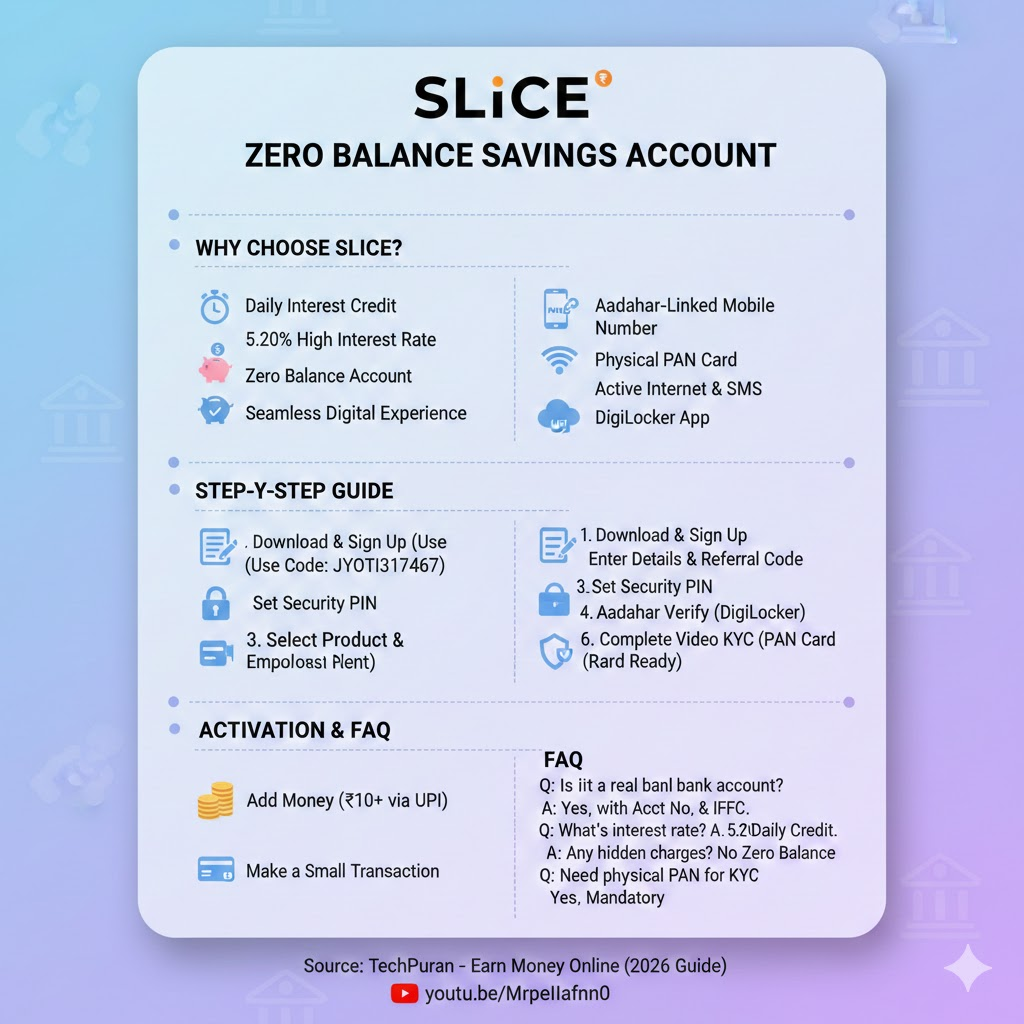
Introduction
Are you looking for a modern banking experience with high returns? The Slice Savings Account is emerging as one of the best zero-balance accounts in 2026. Unlike traditional banks that offer low interest and quarterly payouts, Slice offers a competitive interest rate aligned with the RBI Repo Rate, credited to your account daily.
In this guide, we will walk you through the entire process of opening your account and completing your Video KYC.
Open Slice Zero Bank Balance Account and Get rs 100.
Why Choose Slice Bank Account?
Before jumping into the process, here are the standout benefits mentioned in the video:
- Daily Interest Credit: Most banks credit interest quarterly (every 3-4 months). Slice adds your interest to your balance every single day.
- High Interest Rate: Enjoy a 5.20% interest rate (matching the RBI Repo Rate), which is more than double what major banks like SBI or Canara Bank typically offer.
- Zero Balance Account: No penalties for not maintaining a minimum balance.
- Seamless Digital Experience: Integrated with UPI and an intuitive app interface.
Open Slice Zero Bank Balance Account and Get rs 100.
Pre-requisites for Account Opening
To ensure a smooth registration, keep the following ready:
- Aadhaar-Linked Mobile Number: The SIM card must be in the phone you are using.
- PAN Card: You need the physical 10-digit PAN card for Video KYC .
- Active Internet & SMS Balance: Required for mobile verification.
- DigiLocker: Having the DigiLocker app installed and your documents fetched will speed up the process.
Open Slice Zero Bank Balance Account and Get rs 100.
Step-by-Step Account Opening Process
1. Download and Sign Up
Download the Slice app from the Play Store. Sign in using your Aadhaar-linked mobile number and attach your Gmail account.
2. Enter Details & Referral Code
The app will fetch your name from Gmail. Ensure it matches your Aadhaar card.
- Important: Enter a referral code (e.g., JYOTI317467) during signup to be eligible for joining rewards.
3. Set Security Pin
Create a 4-digit security PIN. You will need this every time you open the app, in addition to your phone’s biometric lock.
4. Select Product & Employment Details
Choose the “Savings Account” option. You will be asked to enter your PAN details and employment status (Salaried, Self-Employed, Student, etc.). Be honest, as the KYC agent may verify this during the video call .

5. Aadhaar Verification via DigiLocker
The app will redirect you to DigiLocker to verify your identity. Enter your Aadhaar number and the OTP sent to your registered mobile number.
6. Complete Video KYC
This is the final step. Click on “Begin Call” to connect with a Slice agent.
- Keep your Physical PAN Card ready.
- Ensure you are in a quiet, well-lit room with a clear background.
- The agent will take your photo, a photo of your PAN card, and ask you to read a 5-6 digit number on the screen .
Open Slice Zero Bank Balance Account and Get rs 100.
Activating Your Account
Once the KYC is complete, your account will usually be ready within 10 minutes. To fully activate it:
- Add Money: Add a small amount (even ₹10 or ₹50) via UPI or the provided Bank details.
- Make a Transaction: Perform a small transaction (like a ₹1 recharge or a transfer) to ensure the account is fully functional.
Open Slice Zero Bank Balance Account and Get rs 100.
Frequently Asked Questions (FAQ)
Q1: Is Slice a real bank account? Yes, it offers a digital savings account with an Account Number and IFSC code, providing interest rates linked to the RBI Repo Rate.
Q2: What is the interest rate in Slice Savings Account? As of 2026, it offers 5.20% interest, which is credited to your account on a daily basis.
Q3: Are there any hidden charges? No, it is a zero-balance account with no maintenance fees or penalties for low balance.
Q4: Do I need a physical PAN card for KYC? Yes, a physical PAN card is mandatory for the Video KYC process to verify your identity.
For more details and a visual walkthrough, you can watch the full video by TechPuran: Watch here